


BYD SPOT
Screen-Clamp Phone Holder Kits for BYD Center Displays
Couldn't load pickup availability


Your phone beside the center display
Position your phone beside a compatible BYD center display with a removable screen-edge clamp. Choose the screen housing first, then the phone holder. The telescoping base grips the opposing upper and lower housing edges without adhesive. Each kit includes the selected base and holder, an extension arm and a locking nut; the magnetic and wireless kits add their matching accessory. Compare the exact base profile and kit photograph before choosing.

Four ways to hold your phone
Gravity cradle · US$58
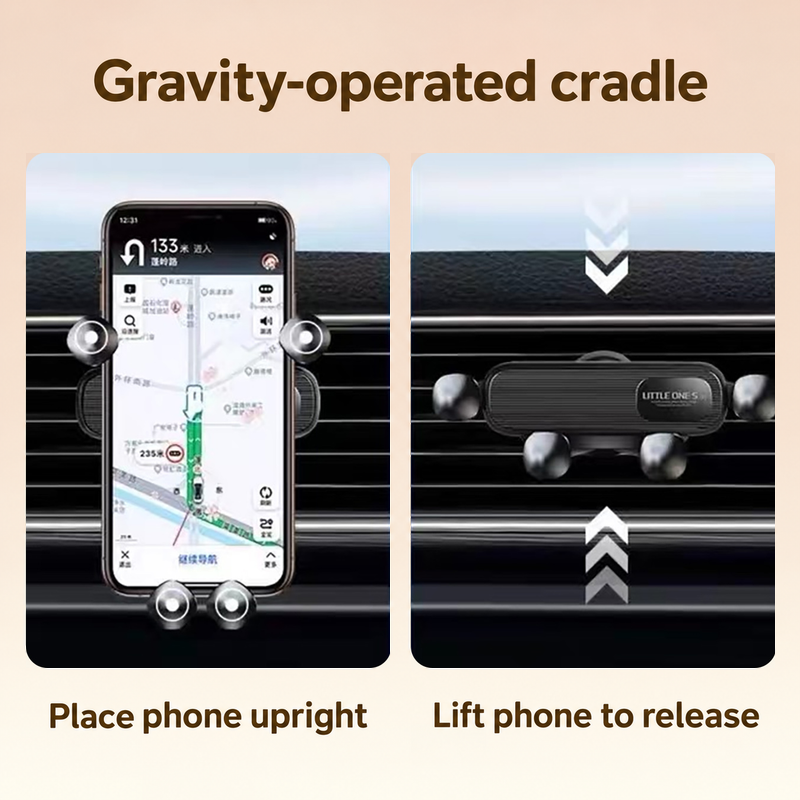
Gravity cradle: lower an upright phone into the linked support arms. The phone's weight closes the cradle; lifting it out lets the cradle return to its compact form. Use the phone in portrait orientation. The cradle can move or rattle on uneven roads; remove the phone before rough-road driving.
Mechanical clamp · US$68
Mechanical clamp: side arms grip the phone and the adjustable lower support leaves an opening for your own charging lead. Remove the protective film from the contact face before use. Use the mechanical cradle in portrait or landscape and set the angle with the vehicle parked.
Magnetic ring · US$78
Magnetic ring: place a phone with a built-in magnetic ring or a compatible magnetic case against the ring-shaped head. The kit also includes a separate magnetic ring. Check the phone and case hold before driving. This version holds the phone and does not provide wireless charging.
Wireless charging · US$158
Wireless charging: the transparent circuit-style head combines powered opening and closing with wireless charging for compatible phones. Connect the supplied cable to a suitable USB power source before use. The front sensor operates while powered; use the rear touch control to release the phone. Center the charging area of the phone against the cradle.
Match the screen housing first
Match the display diagonal and outside housing. The reference examples are approximately 25 × 16 cm for the 10.1-inch screen, 30 × 19 cm for 12.8-inch and 36 × 22 cm for 15.6-inch. These are outside housing guides, not phone dimensions.
For 10.1-inch screens, compare the side-view photographs: the thin housing has a slim edge; the thick housing example has a data port on the left side. The thin base has a ribbed back, while the thick base has a broader solid face. Choose the matching profile, not the diagonal alone.
Do not select these 10.1-inch kits for the excluded 10.1-inch housings on SONG Pro (2023–2025) or YUAN UP / ATTO 2 EV. Enter your BYD model and model year with the order. For other screens, compare the illustrated housing, accessible edges and rear clearance before selecting a base.
The clamp needs access to the upper and lower housing edges. If a storage tray is fitted behind the display, leave 2–3 cm between the tray and the screen as illustrated. Keep the display controls and the driver's view clear.
Set the vehicle display to its intended orientation before mounting. Remove the holder before rotating the display. Use the ball joint and extension arm to position the phone, then tighten the locking nut.
Dimensions and kit contents
| Item | Details |
|---|---|
| 10.1-inch housing guide | ≈ 25 × 16 cm |
| 12.8-inch housing guide | ≈ 30 × 19 cm |
| 15.6-inch housing guide | ≈ 36 × 22 cm |
| Ball joint diameter | ≈ 17 mm |
| Mounting | Telescoping clamp over the display housing edges |
| Each kit | 1 selected base, 1 selected phone holder, 1 extension arm and 1 locking nut |
| Magnetic kit adds | 1 magnetic ring |
| Wireless kit adds | 1 cable; powered operation required |
| Mechanical cradle dimensions | Arm depth shown: 1.5 cm; opening shown: 8.8 cm. Compare your phone and case with the cradle before use. |
| Color | Black |
Fit the base, then the holder
- Park the vehicle. Compare the screen size, outside housing and side profile with the selected base. Check the upper and lower contact edges and rear clearance. Set the display orientation first.
- Extend the base over the opposing housing edges. Seat the contacts evenly and check the base is held securely without obstructing display controls.
- Fit the extension arm and selected holder using the locking nut. Adjust the ball joint while parked and tighten it. Keep any charging cable clear of moving arms.
- Insert the phone according to the selected head. Keep gravity-held phones upright; check a magnetic phone or case holds firmly; connect power before operating the wireless cradle. Check the view and controls before driving.
Everyday use and care
Remove the phone before adjusting, cleaning or removing the mount. Wipe the hardware and screen contact points with a soft, dry cloth and check the clamp and locking nut periodically. Keep powered components dry. The gravity cradle is for portrait use on normal paved routes; remove the phone before rough-road driving because the linked arms may move or rattle.
Questions before ordering
Which 10.1-inch option should I choose?
Compare the housing side profile and base photograph. The thick example has a left-side data port. These kits exclude the stated SONG Pro and YUAN UP / ATTO 2 EV 10.1-inch housings; a matching diagonal alone is not enough.
Do all four versions charge the phone?
Only the powered wireless-charging version provides wireless charging. Gravity, mechanical and magnetic versions hold the phone. Route your own charging lead clear of moving supports when needed.
What is supplied with the selected kit?
One matching base, the selected phone holder, one extension arm and one locking nut. Magnetic kits add one magnetic ring; wireless kits add one cable. The illustrated phone, vehicle display and phone case are installation examples.
Can I rotate the screen with the mount fitted?
Remove the mount before rotating the vehicle display. Adjust the phone's ball joint only while parked and keep the display controls accessible.
Explore BYD storage accessories
Pair your screen setup with practical cabin storage. Browse Storage & Convenience or use the fitment guide to check the details to compare before ordering.
Shipping and returns
Standard shipping is free on merchandise orders of US$29.90 or more; below that threshold, standard shipping is US$9.90. Order preparation normally takes 2–5 business days, and transit time varies by destination. Request eligible returns within 30 calendar days of delivery with the item unused, uninstalled and all supplied parts included. Contact BYD SPOT for return authorization before sending an item back. Import charges may be payable when not collected at checkout.